
Quick Summary
When an automated driveway gate fails to open or close, systematic gate opener troubleshooting helps property owners quickly isolate power failures, sensor misalignments, and mechanical binding before scheduling costly repairs. The diagnostic specialists at Ironworks Gate Co. recommend testing manual travel resistance and clearing photo-eye obstructions first, while leaving internal motor humming, high-voltage wiring, and limit recalibrations to certified technicians. Readers will learn how to decode operator noises, safely test battery backups and access accessories, and determine when to book an on-site professional diagnostic assessment.
Gate Opener Troubleshooting: Fast Fixes to Restore Access
A gate opener that suddenly stops working can leave your vehicle trapped inside the driveway or an entire commercial lot exposed. Automated gate operators handle heavy physical loads, which means troubleshooting requires a clear, safe approach. While modern gate systems include electronic safeties, technicians at Ironworks Gate Co. note that potential failure areas include missing power, obstructed safety sensors, or physical binding along the track and hinges (the supplied evidence does not establish the frequency of specific failure causes).[1]
Before replacing control boards or motors, work through these diagnostic checks to help isolate the cause of the problem. See also Electric Gate Troubleshooting | Call Now-10% Off | Same-Day Service | Free Estimate.
Quick Diagnostic Guide: Symptoms and Immediate Checks
When an automated gate fails, inspecting observable symptoms can help identify the affected area. Always consult the specific operator’s manual for verified diagnostic procedures.
| Symptom | Potential Cause | Immediate Check |
|---|---|---|
| Motor silent; no diagnostic lights on control board | Tripped circuit breaker, blown fuse, or power interruption | Check power switches and breakers; consult the manufacturer manual for power verification. |
| Gate moves slightly, stops, or reverses | Blocked or misaligned photo-eyes, or physical obstruction in path | Check optical sensor alignment LEDs; clean lenses; inspect track for debris or binding. |
| Motor hums or buzzes, but gate does not move | Capacitor issue, seized hinge, or mechanical binding | Release manual disconnect to test physical resistance by hand. Contact a qualified technician if humming persists. |
| Control board clicks when signal is sent, but motor does nothing | Motor fault, drive linkage issue, or blown fuse | Refer to manufacturer instructions to inspect drive components and limit switches. |
| Gate works with keypad or push button, but not remote | Depleted remote battery, antenna fault, or signal interference | Replace transmitter batteries; verify receiver antenna is intact and properly positioned. |
Tools and Safety Precautions Before You Begin
Automated gate operators run on high torque and electrical power. Safety is the top priority during any inspection.[4]
Safety warning: Avoid touching or testing exposed electrical components and high-voltage wiring unless you are qualified. For persistent humming, unusual noise, or failed movement, contact a qualified technician. Always switch off the main power breaker before inspecting mechanical components. Never stand in the travel path of a gate leaf while operating the gate.
Recommended Diagnostic Tools
- Digital Multimeter: For measuring electrical values according to manufacturer specifications (qualified personnel only).
- Manual Release Key or Allen Tool: Required to disconnect the drive arm or chain drive and check physical movement.
- Silicone or White Lithium Lubricant: For lubricating hinge pins and guide rollers (avoid sticky grease that collects sand and grit).
- Clean Microfiber Rag: For cleaning optical sensors and reflector panels.
- Torpedo Level: To verify whether gate posts have moved out of vertical alignment.
Step 1: Inspect Power Supply, Breakers, and Backup Batteries
Need gate opener troubleshooting?
We’re available now - call for a fast, free estimate.
Power interruptions can cause an automated gate to stop working, though the supplied evidence does not establish the frequency of service-call causes. Voltage tests and electrical checks should only be performed as verified against the manufacturer manual for your specific operator.
Line Power and Solar Panels
- Check the Subpanel Breaker: Check if dedicated circuit breakers have tripped. Reset the breaker fully to the OFF position, then back to ON.
- Check the Ground Fault and GFCI Outlets: If your operator connects to an outdoor GFCI outlet or weather-sealed junction box, check whether the reset button has tripped.
- Solar Setups: For solar-powered operators, check that the panel surface is clear of pollen, dust, and tree shade. Test solar output according to manufacturer instructions.
Testing DC Battery Backups
Many operators rely on battery backup systems. Refer to the specific manufacturer manual for verified testing and replacement procedures:
- Refer to the operator manual for safe battery disconnection and voltage testing guidelines.
- Verify battery condition against the voltage parameters published by the specific manufacturer.
- Inspect battery terminals for corrosion that can impede power delivery.
Step 2: Clean and Realign Photo-Eye Safety Sensors
Safety sensors serve as entrapment-protection measures and may stop or reverse gate motion when obstructed. Always consult your operator manual for specific sensor alignment and diagnostic procedures.
Safety warning: Follow the manufacturer’s specified test procedure for all safety sensors. Never bypass safety devices or operate the gate with faulty or non-functioning sensors.[3]
Diagnosing Sensor LEDs
Look at the indicator lights on the face of your photo-eye housings according to the manufacturer manual:
- Solid Indicator Light: Typically indicates power and optical alignment across the opening.
- Flashing or Extinguished LED: Typically indicates misalignment or beam obstruction.
Clearing Environmental and Optical Interference
- Clean the Lenses: Remove spiderwebs, dirt, and debris from emitter and reflector lenses using a soft, damp cloth.
- Correct Sunlight Glare: Sunlight shining directly into the receiving lens can interfere with optical beams. Adjust shielding or reposition sensors according to manufacturer guidance.
- Tighten Mounting Brackets: Check mounting brackets to ensure vibration has not shifted sensor alignment. Adjust until properly aligned and secure firmly.
Step 3: Disengage the Clutch to Test for Mechanical Resistance
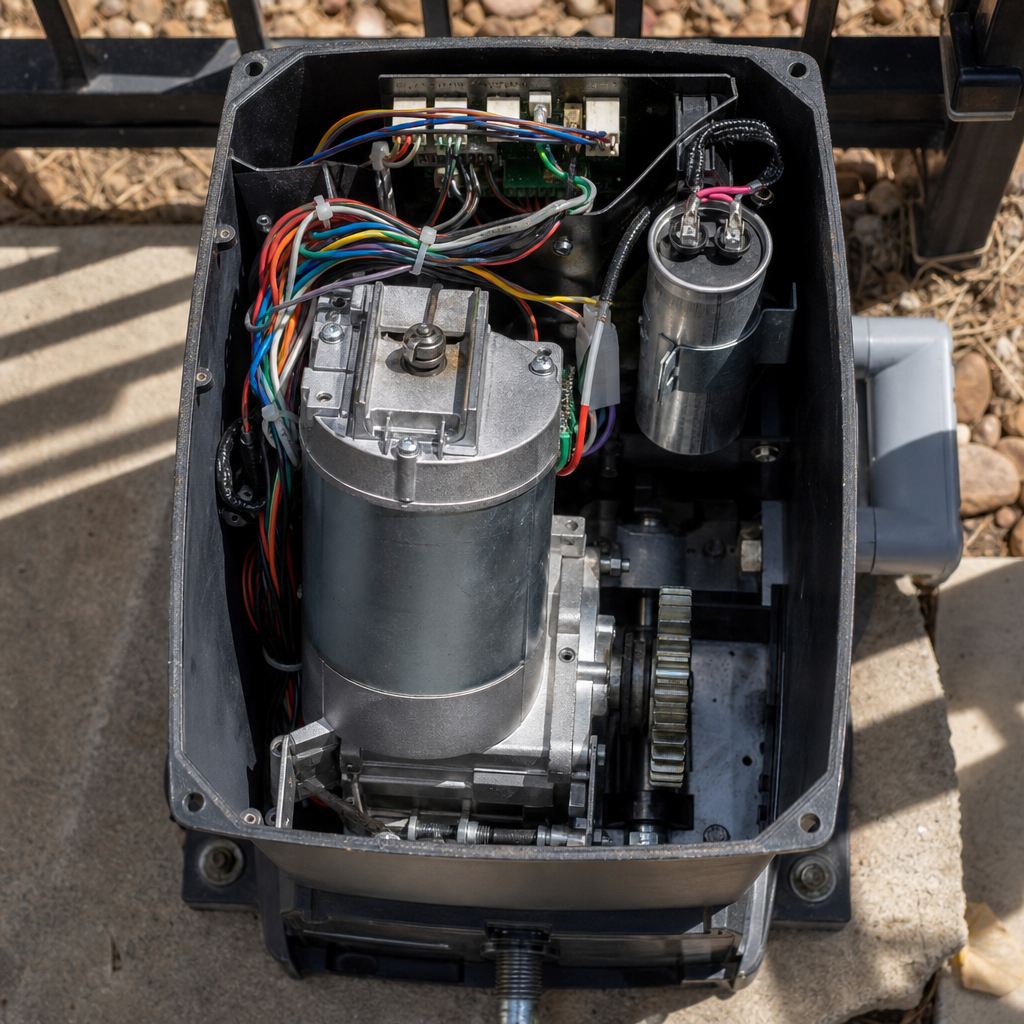
Physical mechanical binding can overload the drive mechanism. The supplied evidence does not establish the frequency of mechanical binding relative to other failure causes, but physical movement checks are a standard diagnostic step.[2]
Thermal Soil Movement and Post Deflection
According to specialists at Ironworks Gate Co., in regions with shifting soils, weather extremes can exert pressure on gate post footings. When a post tilts out of alignment, the gate leaf drops, misaligning hinges or slide tracks. The motor encounters resistance, which may trigger overload protection.
How to Check for Mechanical Binding
- Use your manual release key or disconnect pin to uncouple the gate from the operator arm or drive chain.
- Move the gate leaf by hand through its complete travel path from fully open to fully closed.
- Evaluate the resistance: The gate should glide smoothly. Grinding, binding, or excessive resistance indicates a structural or mechanical issue.
- Check the hinge post with a torpedo level. If the post is visibly leaning, hinge adjustments or footing remediation may be required.
Step 4: Decode Motor Sounds (Clicking, Humming, or Silence)
The sounds an operator makes provide diagnostic clues:
1. Control Board Clicks, but Motor Stays Silent
A clicking sound indicates logic relays are engaging. If the motor does not engage, refer to manufacturer documentation for verified wiring checks and fuse inspections.
2. Motor Hums or Buzzes Without Moving the Gate
Motor humming without movement indicates the motor is energized but unable to turn. For persistent humming, unusual noise, or failed movement, contact a qualified technician to inspect internal capacitors, gearboxes, or mechanical binding.
3. Complete Silence
If there are no sounds or indicator lights, check main power connections and master switches according to the manufacturer manual.
Step 5: Test Remote Controls, Keypads, and Loop Detectors
Need gate opener troubleshooting?
We’re available now - call for a fast, free estimate.
If the gate operates from some inputs but not others, isolate individual access accessories.
Radio Transmitters and Receivers
- Replace the Battery: Replace transmitter batteries to ensure adequate signal strength.
- Inspect the Receiver Antenna: Ensure the antenna is intact and positioned according to manufacturer specifications.
- Check for Signal Interference: Nearby electronic devices can sometimes cause radio frequency interference.
Keypads and Hardwired Accessories
- Check terminal wiring according to the specific operator wiring diagram.
- Inspect keypad enclosures for debris, moisture, or insect intrusion.
- For underground vehicle exit loops, inspect the loop detector module indicators according to the component manual.
Step 6: Reset the System and Recalibrate Limits
Do not attempt a generic reset procedure. Refer directly to the manufacturer instructions for your specific operator model to perform a system reset or travel limit recalibration.
Travel Limit Adjustment
If the gate stops prematurely or contacts hard stops, travel limits may require adjustment. Follow the manufacturer-prescribed calibration procedure for your specific mechanical or electronic limit system.
Brand-Specific Troubleshooting Notes
For model-specific error codes, diagnostic flash counts, beep patterns, and programming steps, consult the official manufacturer manual for your exact gate operator model. Diagnostic codes and test procedures vary across models and manufacturers.
Frequently Asked Questions
Why is my electric gate opener not responding to the remote or keypad?
Potential causes include depleted remote batteries, an interrupted power supply, or accessory wiring faults (the supplied evidence does not establish their exact frequency). Refer to your operator manual to verify input terminal signals and fuse integrity.
What causes an automatic gate to open partially and then stop or reverse?
Safety sensors are entrapment-protection measures and may stop or reverse gate motion when obstructed or misaligned. Mechanical binding from shifted posts or unlevel tracks can also trigger overload limits.
How do I test and fix automatic gate safety sensors?
Clean the sensor lenses and verify alignment indicator LEDs. Always follow the manufacturer’s specified test procedure for safety sensors. Never bypass safety devices or operate the gate with faulty sensors.[5]
Why is my gate opener clicking or humming but not moving?
Clicking can indicate relay actuation without motor drive, while humming indicates the motor is receiving power but stalled. For persistent humming, unusual noise, or failed movement, contact a qualified technician.
How do I manually reset an automatic driveway gate opener system?
Because reset steps vary by make and model, always follow the manufacturer’s specific instructions rather than attempting a universal power-reset sequence.
When should I call a professional technician instead of DIY gate repair?
Contact a qualified technician, such as the team at Ironworks Gate Co., if troubleshooting involves exposed electrical components, high-voltage testing, structural damage, persistent humming, unusual noise, or failed movement.
Need gate opener troubleshooting?
We’re available now - call for a fast, free estimate.
Sources
- [PDF] Residential-Garage-Door-Operators-Revision-of-UL-Standards … – cpsc.gov (2023)
- Microsoft Word – BVS Final Rule for Gates and Enclosures – cpsc.gov (2019)
- Update of Automatic Garage Door and Garage Door Openers Entrapment Incidents to Children under 15 Years of Age Reported to CPSC Between December 1, 1996 and June 30, 2003 – cpsc.gov (2003)
- Garage Door Operators/Gate Operators – cpsc.gov (2003)
- Search product safety incidents, recalls … – opendata.ul.org (2025)
Related reading: Automatic Gate Opener Problems | Call Now-10% Off | Same-Day Service | Free Estimate
Related reading: Electric Gate Manual Release Key | 10% Off & Free Estimate | Same-Day Service
Related reading: How to Manually Open Electric Gate | Call Now-10% Off | Same-Day Service | Free Estimate
Frequently Asked Questions
What should I do if soil movement causes my gate posts to lean and bind the opener?
When shifting soil knocks gate posts out of plumb, releveling hinges or realigning ground tracks is necessary to eliminate motor strain and prevent overload tripping. If manual adjustments cannot restore smooth travel, Ironworks Gate Co. can perform an on-site structural assessment and footing realignment.
How do I know if my gate opener backup battery needs to be completely replaced?
If your gate operates sluggishly or fails during power outages despite clean terminals, the battery likely holds insufficient voltage under load. Testing with a multimeter against manufacturer specifications will confirm if the cells are degraded and require replacement.
What happens during a professional gate opener diagnostic assessment if DIY fixes fail?
Certified technicians evaluate internal motor capacitors, control board relays, limit switches, and safety circuitry using specialized diagnostic tools to pinpoint electrical or mechanical faults safely. Ironworks Gate Co. offers same-day dispatch and diagnostic assessments to restore secure operation without risking damage from high-voltage components.
About the author
 |
Steven Caldwell Steven Caldwell is a licensed access control technician and technical writer with over 12 years of experience in residential and commercial gate systems. He holds an associate degree in electronics technology from Tarrant County College. Drawing on his field experience, Steven writes informative guides to help property owners in North Texas understand gate maintenance, troubleshoot common issues, and navigate repair costs. |
Gate not opening, off track, or opener dead?
We’re available now - call for a fast, free estimate.
Call Now - Free Estimate